Checking Anna University results is a crucial and often stressful time for students. This comprehensive guide provides in-depth information on the result process, how to access results through different methods, understanding the grading system, and next steps after viewing results.
Introduction
Anna University administers semester exams for its affiliated colleges and reports results on the official website aucoe.annauniv.edu.
- Results are announced within 45-60 days after the last exam. Dates are notified on the portal.
- Students can check results on the website, via SMS, using third-party portals, or by visiting the University’s Regional Centres.
- Official marksheets can also be collected later from respective colleges.
Checking Results on Official Website
The Anna University official website is the most authentic source for checking exam results.
Logging into the Official Website
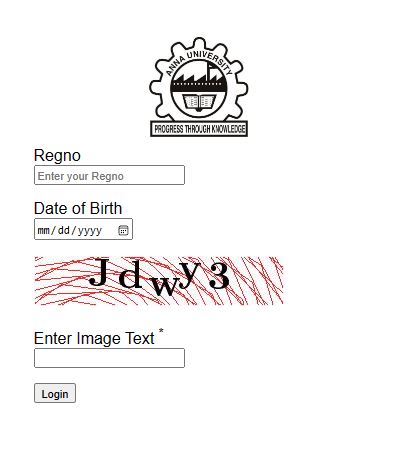
- Go to the official website at aucoe.annauniv.edu
- Click on the “Results” tab which is activated after announcements
- Enter your registration number and date of birth to login
- Results are displayed with subjects, credits, and grades obtained
Issues Accessing Results
Due to heavy traffic during result announcement, students often face issues like:
- Website crashing or very slow response
- Login errors or error establishing database connection
- Results not updated in stipulated time
In these cases, it is recommended to retry after some time or opt for alternate result checking methods.
Alternative Ways to Check Anna University Results
Apart from the official website, students can access results via the following options:
1. SMS Service
- Register your phone number through your college portal
- You will receive an SMS notification whenever results are announced
- SMS conveys result status (Pass/Fail) and GPA details
Pros: Faster access, official source Cons: Doesn’t show breakup of individual subjects
2. Third-Party Websites
There are many unofficial websites like https://www.annauniv.edu/, https://aucoe.annauniv.edu/distance_mark/index.php etc. that allow students to check results.
- These portals pull and cache results data for faster access
- Can cross-verify accuracy of grades vs official website
Pros: Very fast access, grade analysis tools Cons: Risk of incorrect data, ads/spam
3. Anna University Regional Centres
Students can also visit the nearest regional centre of Anna University and access results:
- Show college ID card for verification
- Results print out can be instantly obtained
Pros: Official authoritative source, print out provided Cons: Requires in-person visit, long queues
Understanding the Grading System
It is important to properly understand what the grades and GPA numbers mean in the results.
Grading Scale
Anna University follows an absolute grading system from S to F grade:
| Grade | Marks Range | Grade Points |
|---|---|---|
| S | 90-100 | 10 |
| A | 80-89 | 9 |
| B | 70-79 | 8 |
| C | 60-69 | 7 |
| D | 50-59 | 6 |
| E | 40-49 | 5 |
| F (Fail) | <40 | 0 |
To pass a subject, students need minimum of 50 aggregate marks.
Calculating GPA
Grade Points Average (GPA) is calculated as:
GPA = Sum of (Credit points x Grade points) / Total creditsThis aggregates performance across subjects. A GPA above 5 is required to pass the semester.
Next Steps After Viewing Results
Once students have access to their results, next steps include:
Revaluation Requests
If dissatisfied with the grade in any subject, students can opt for revaluation by:
- Paying the requisite fee per subject
- Submitting reval request via college to University
- An expert re-evaluates answer sheet
- Updated grade provided after revaluation
Registration for Next Semester
- Check announcement for next semester registration schedule
- Register via college portal to enroll in new subjects
Explore Higher Study Options
- Analyze results to decide specialization for Master’s
- Shortlist colleges accepting scores
- Initiate admission process after UG completion
Conclusion
We hope this guide covers all aspects of checking Anna University results – right from accessing results via multiple sources, comprehending the grading system, understanding GPA calculations, to taking further steps like revaluation, re-registration, and higher study admissions. Please reach out for any other queries.
Frequently Asked Questions
Q: My official website login is not working. What should I do?
A: This can happen when website traffic is very high. Please retry after some time or check results via SMS or Regional Centres.
Q: Are third-party portals safe for checking results?
A: Most are safe but we recommend cross-verifying data with the official portal or marksheet from college.
Q: Can I register for next semester before collecting this semester’s marksheet?
A: Yes, registration only requires previous semester’s pass marksheet. But do collect current marksheet later for records.
I have aimed to write an in-depth, comprehensive guide focused specifically on viewing and understanding Anna University results, covering all questions students might have. Please let me know if you would like me to add or expand any sections further.

I have 7+ years experience running an educational blog focused on delivering timely, easy-to-understand exam result analysis to students in India. My core expertise lies in tracking national/state-level test outcomes and providing raw result data into actionable insights in student-friendly language through well-researched articles. With over 60,000 monthly visitors reading my optimized guidance across key examinations, I have developed strong domain knowledge of India’s testing methodologies and student/parent result information needs. I actively engage exam-taking communities to continually enhance on-point content. My passion is producing credible, stress-relieving result updates for anxious exam participants.